Payroll Software in India – Automated Salary, Attendance & Statutory Compliance
NexoraHRMS is an India-focused payroll management system that automates monthly salary processing, attendance-linked payroll, PF, ESI, Professional Tax and TDS calculations. Generate payslips, Form 16, statutory files and salary bank files from the same payroll software, so payday is a review, not a scramble.
PF · ESI · PT · TDS built inNew + Old tax regimeTally XML + bank file exportSelfie & GPS attendance

Payroll Management Software for Indian Businesses
NexoraHRMS is online payroll software built around how Indian payroll actually works: statutory deductions, state-wise Professional Tax, two income-tax regimes and the paperwork that follows every month and every year. It replaces Excel salary sheets with one payroll system for salary, attendance, leave management and an employee self-service portal.
Whether you are searching for payroll software for a 20-person company or an HR payroll system for several branches, the working method is the same: capture attendance, pre-check, approve, lock, pay and file. Read more on our payroll management software page.
- Salary processing with arrears, loans, overtime, shift allowance and one-time earnings
- Month lock with four-step sign-off, so issued payslips never change
- PF, ESI, Professional Tax and TDS calculation
- Payslip generator with bulk email to employees
- Form 16, ECR and ESI files, Tally XML and bank file

Why Choose NexoraHRMS Payroll Software?
Built for Indian payroll
PF wage ceiling, ESI ceiling, state-wise Professional Tax, New and Old tax regimes, Form 16 and Form 24Q are part of the product, not add-ons.
Real screens, no mock-ups
Every screenshot on this site comes from the working product, shown with demo employee data. Ask for a live demo and see the same screens on your data.
Control before you pay
Pre-checks for duplicate PAN or bank account, missing IFSC or UAN, a ready-to-lock score and a four-step sign-off catch errors before salary is paid.
Connects to how you work
Tally XML journal export, bank files for HDFC, ICICI, SBI and Axis, biometric file import and a REST API for your other systems.
Mobile app for staff
Installable app in English and Hindi for check-in, leave, payslips and profile, with no app store needed.
Delhi-based support
NexoraSoft is a software company in Kirti Nagar, New Delhi with 19+ years of software engineering experience and 50+ projects delivered, and you deal with the team that builds the product.
Payroll Processing & Salary Calculation Software
Payroll Processing Software
Monthly salary runs with flexible salary structures, arrears, one-time earnings and a pre-run preview. Process once, with duplicate runs blocked automatically. Salary calculation software.
PF, ESI & Professional Tax
Provident Fund, ESI and state-wise Professional Tax calculated from your rules, with editable PT slabs when a state revises them.
TDS & Form 16 Software
Income tax under the New and Old regimes, monthly TDS projection, annual TDS statement and Form 16 Part B for every employee.
Attendance & Leave Management
Selfie and GPS check-in with office geofence, QR kiosk, biometric file import, night shifts, holidays, leave balances, comp-off and loss of pay, all linked to payroll.
Loans, Advances & Expense Claims
EMI recovery from salary, salary advances and expense claims with approval, all reflected on the payslip.
Payslip Generator & Email
Branded payslips generated in bulk and emailed as PDF to each employee, or shared on WhatsApp, with download from the self-service portal.
Full & Final Settlement
Notice period, leave encashment, gratuity and F&F settlement calculated in one exit workflow.
Statutory Returns & Exports
EPFO ECR, ESI challan, Form 24Q summary, Tally XML journal export and a bank payment file for salary transfer.
HRMS Core Modules
Employee database, onboarding, recruitment, performance, training, assets, helpdesk tickets, internal chat and organisation chart alongside payroll.
PF, ESI & Professional Tax Payroll
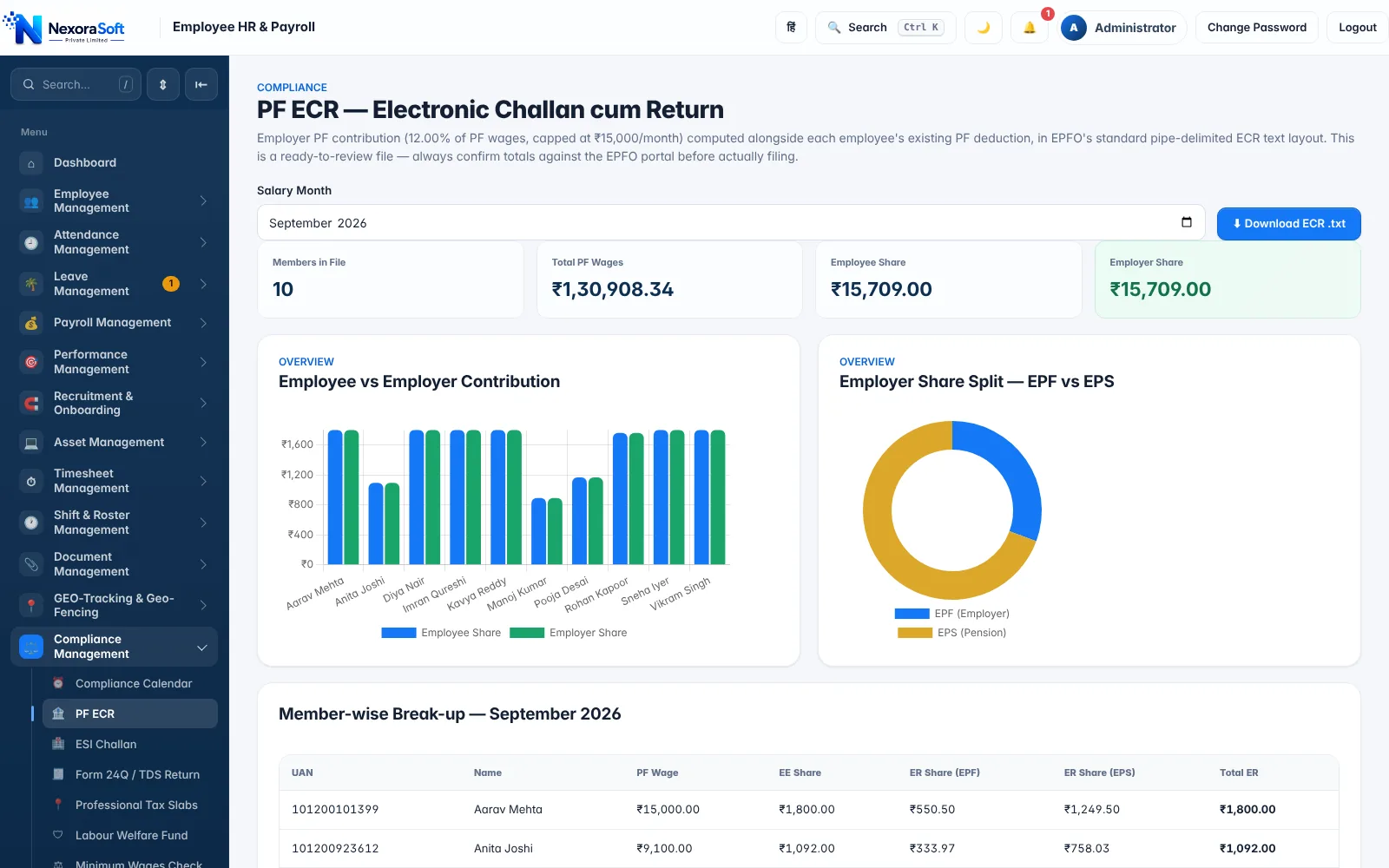
Provident Fund, ESI and Professional Tax are the three deductions that cause the most corrections in manual payroll. NexoraHRMS applies the PF wage ceiling, the ESI wage ceiling and your state's PT slab automatically, then reports them in the format you need to pay and file.
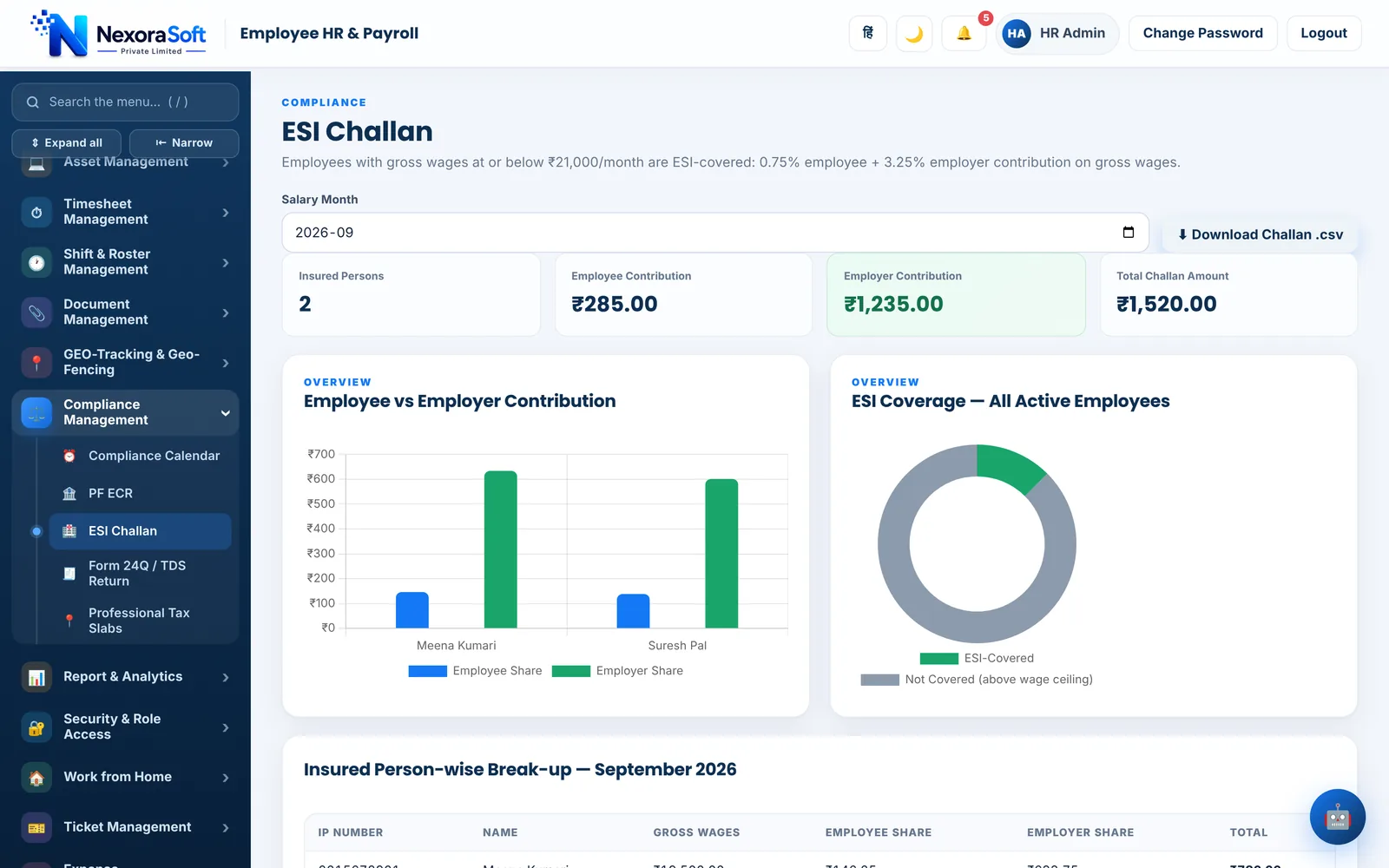
The PF ECR screen shows each member's UAN, PF wages and the EPF/EPS split, and downloads the Electronic Challan cum Return text file for the EPFO portal. The ESI screen lists insured persons and the employee and employer contribution, and exports the monthly challan statement.
- PF: employee and employer share on wages up to the ceiling set in Company Settings, with EPF/EPS split
- ESI: covered staff picked automatically by the ₹21,000 gross wage limit; 0.75% employee and 3.25% employer
- Professional Tax: state-wise slabs by work state, editable per state, with February override
- Dedicated guides: PF payroll software, ESI payroll software, Professional Tax software
TDS, Form 16 & Income Tax Payroll
Salary TDS is where payroll meets income-tax law. NexoraHRMS lets you choose the regime for each employee, projects the year's tax from salary and declarations, and deducts it in equal monthly amounts. In the Old regime it works with rent paid (HRA), Section 80C and 80D declarations; in the New regime it applies the regime's own rules.
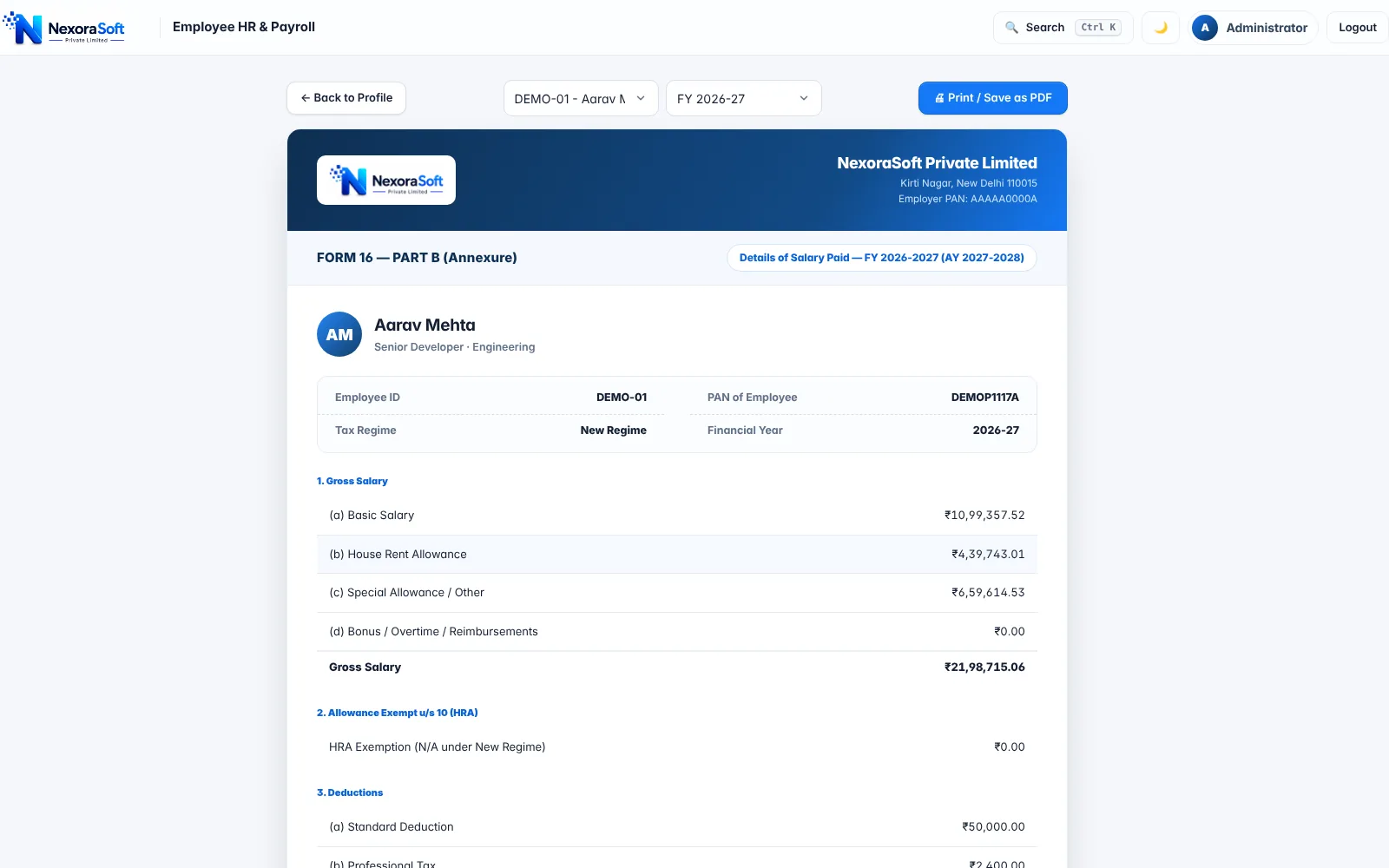
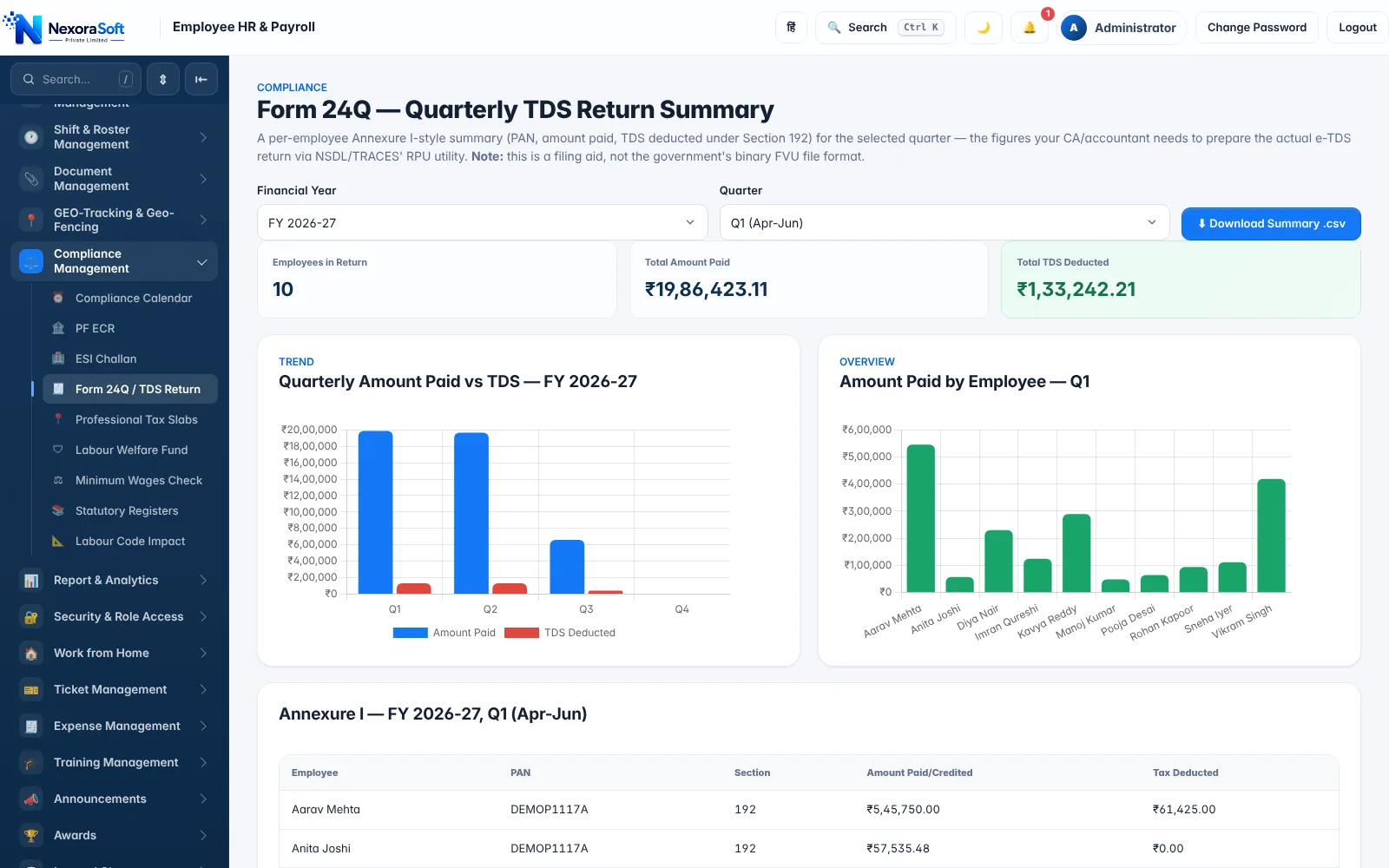
At year-end the same data produces the annual TDS statement and Form 16 Part B, and the quarterly Form 24Q summary your CA or tax team needs for filing. Tax rules change with each Budget, so confirm current rates and rebates with your tax advisor, and update the rules in settings when they change.
- Automatic TDS under New or Old regime, or a manual TDS amount per employee
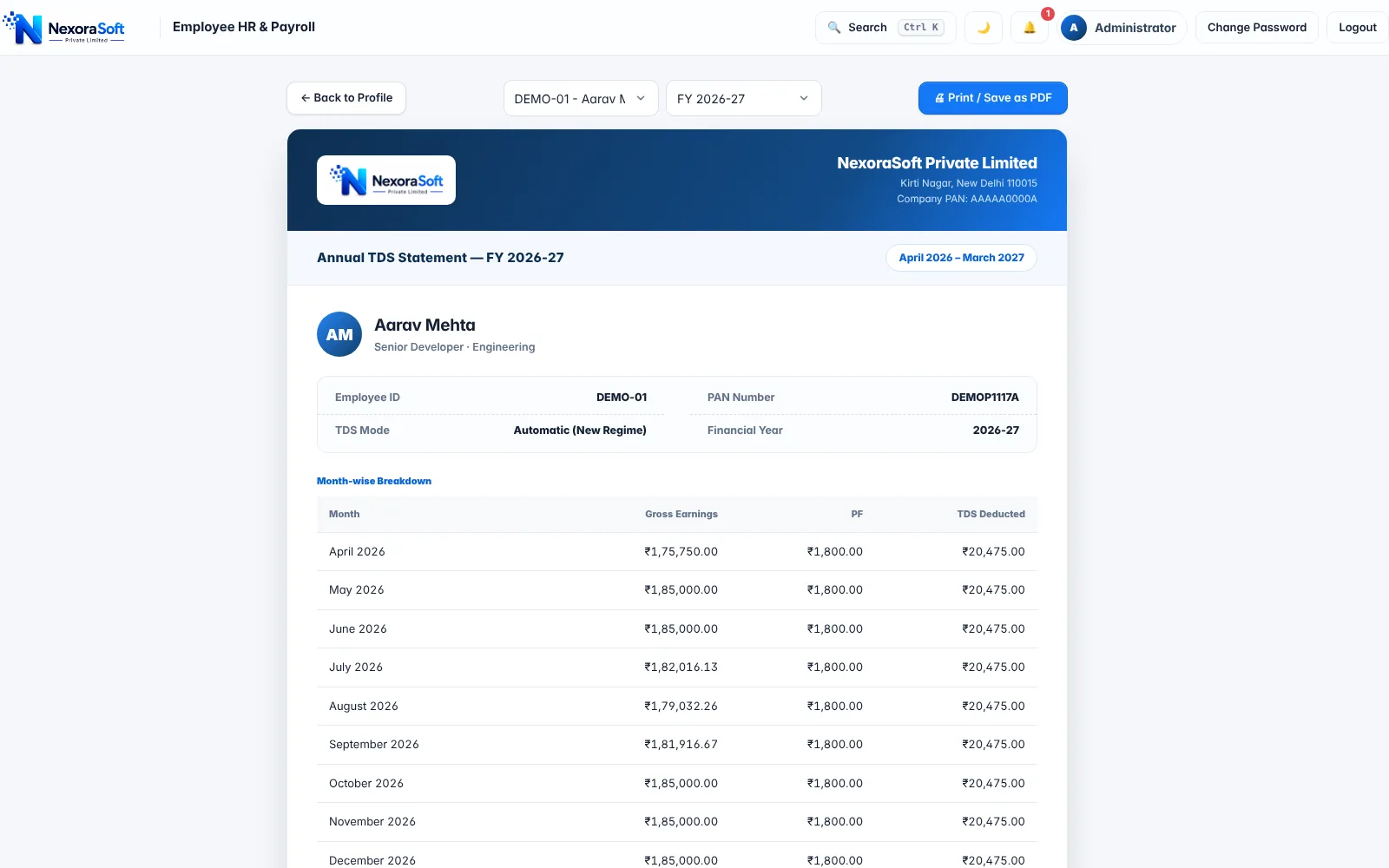
- Annual TDS statement with month-wise gross, PF and TDS deducted
- Form 16 Part B annexure with HRA exemption, standard deduction and chapter VI-A deductions
- Form 24Q quarterly summary with employee-wise annexure
- Guides: TDS payroll software and Form 16 software
Attendance, Leave & Loss of Pay
Salary is only as accurate as attendance. NexoraHRMS keeps attendance, leave and payroll in one database, so a late approval or a corrected punch changes the payslip without any re-entry. Days with no attendance record count as absent by default, a policy you can change in Company Settings.
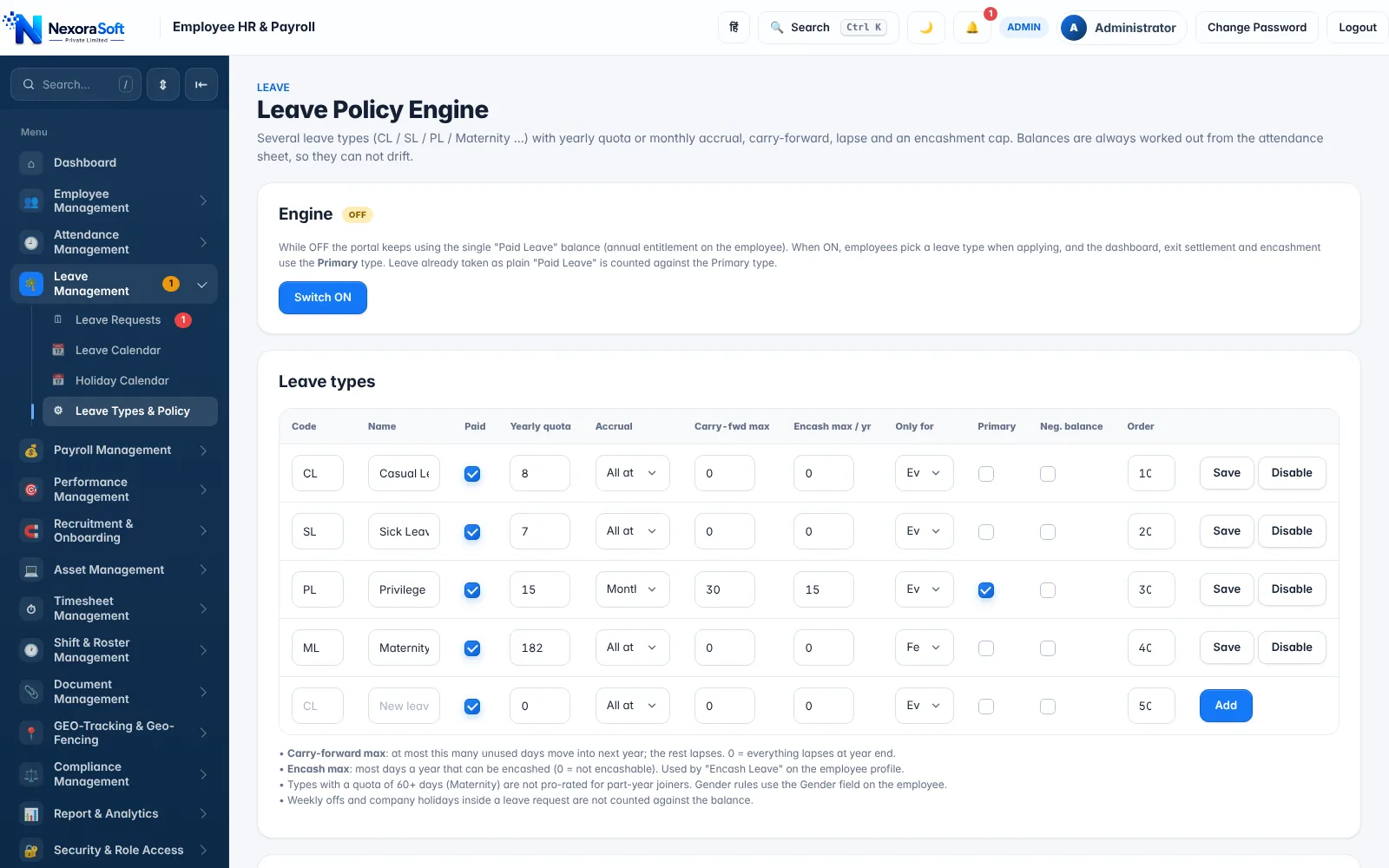
Capture attendance the way your workforce actually works: selfie and GPS check-in on the mobile app, a QR or PIN kiosk at the office door, or a punch-machine file from your biometric device. Leave types follow your policy, with quota, accrual, carry-forward and encashment.
- Selfie and GPS check-in with office geofence and out-of-zone flags
- QR/PIN kiosk and biometric punch-file import
- Shifts, night shifts, holidays, weekly offs and comp-off
- Leave policy engine and approvals; unpaid days become loss of pay automatically
- See attendance and payroll software
Salary Slip & Payslip Generator
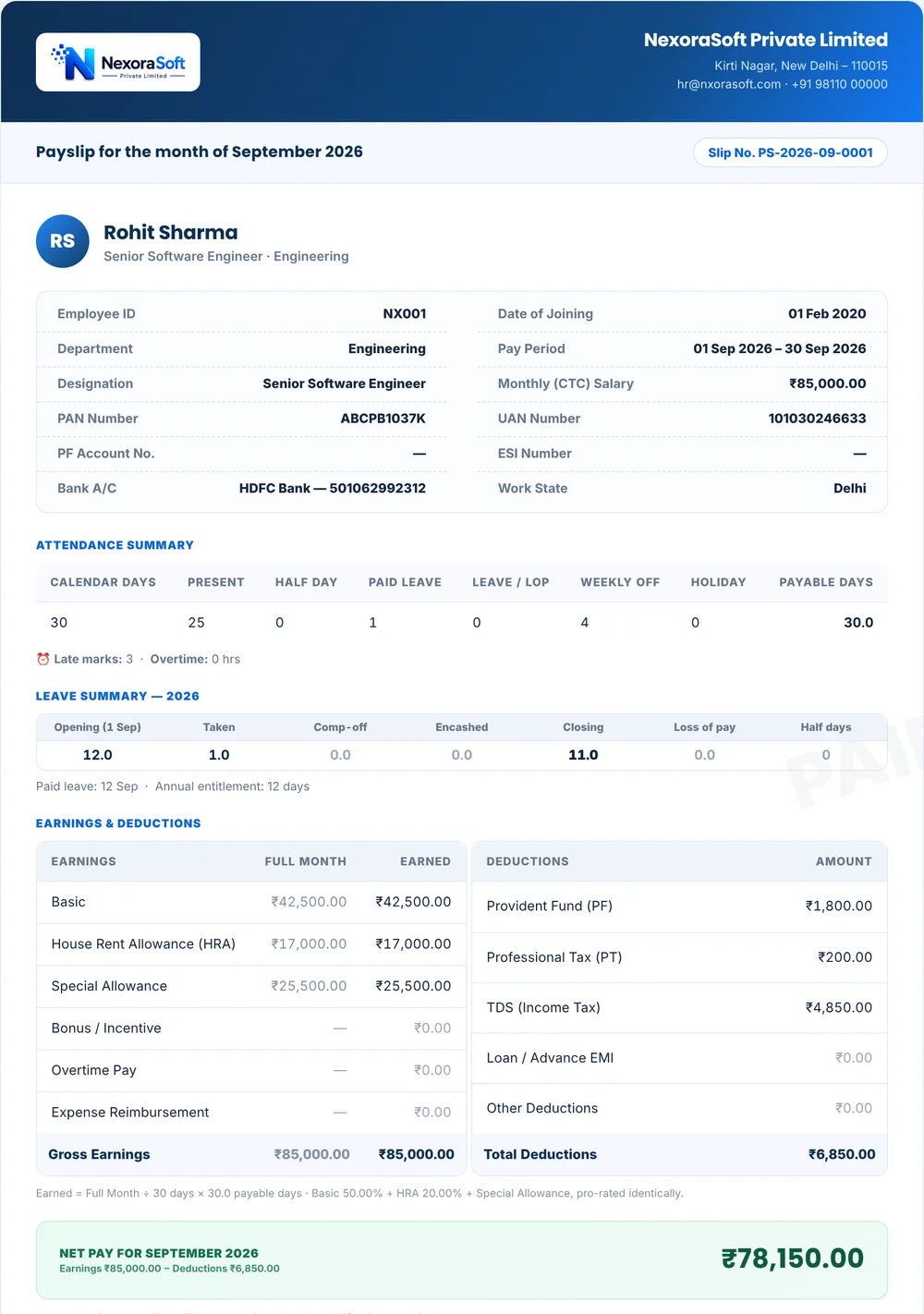
A payslip should be clear to the employee and defensible to an auditor. NexoraHRMS payslips show attendance summary, leave balance, earnings and deductions, net pay in words and year-to-date totals, and carry your company logo and details.
Send them all at once: bulk email with the PDF attached, a single PDF download per employee, or a ready-typed WhatsApp message. Employees can also download payslips from the self-service portal at any time.
- Branded PDF payslips, one click for all employees
- Email, WhatsApp share and portal download
- Locked months freeze payslips so figures cannot change after issue
- See payslip software and the payslip guide
Employee Self-Service Portal & Payslip Software
Staff log in to see their own data and nothing else, which cuts routine questions to HR. Roles for admin, HR manager, finance viewer and employee keep salary and bank details visible only to those who should see them.
- Installable mobile app (PWA) in English and Hindi, no app store needed
- Check in with selfie and GPS, or scan the office QR kiosk
- Download payslips and annual tax statements any time
- Apply for leave, check balances and the holiday calendar
- Update profile, upload documents and raise expense claims
- In-app notifications and an audit trail of who changed what


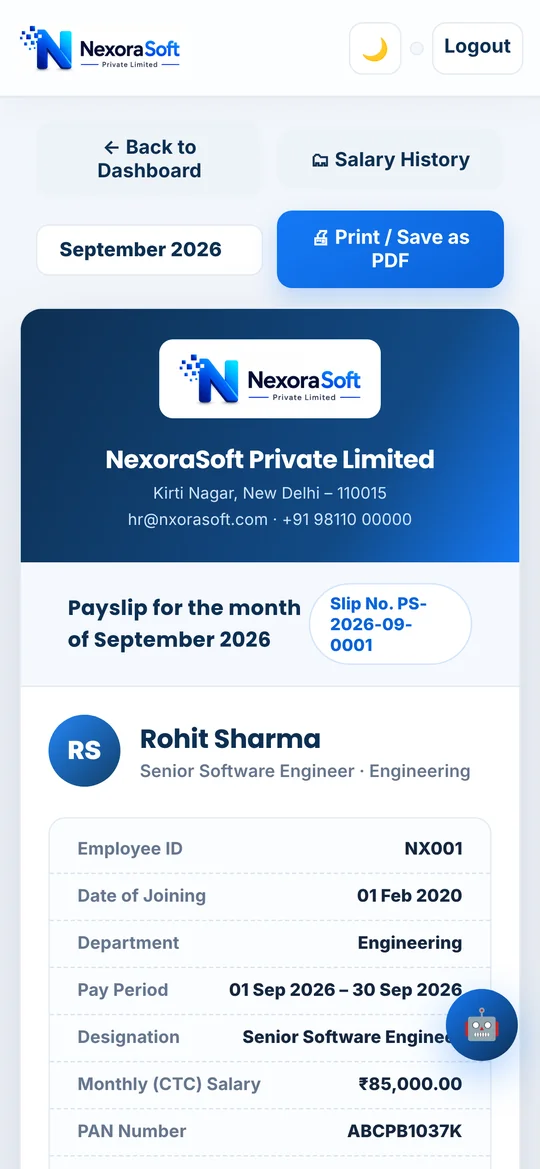
Full & Final Settlement
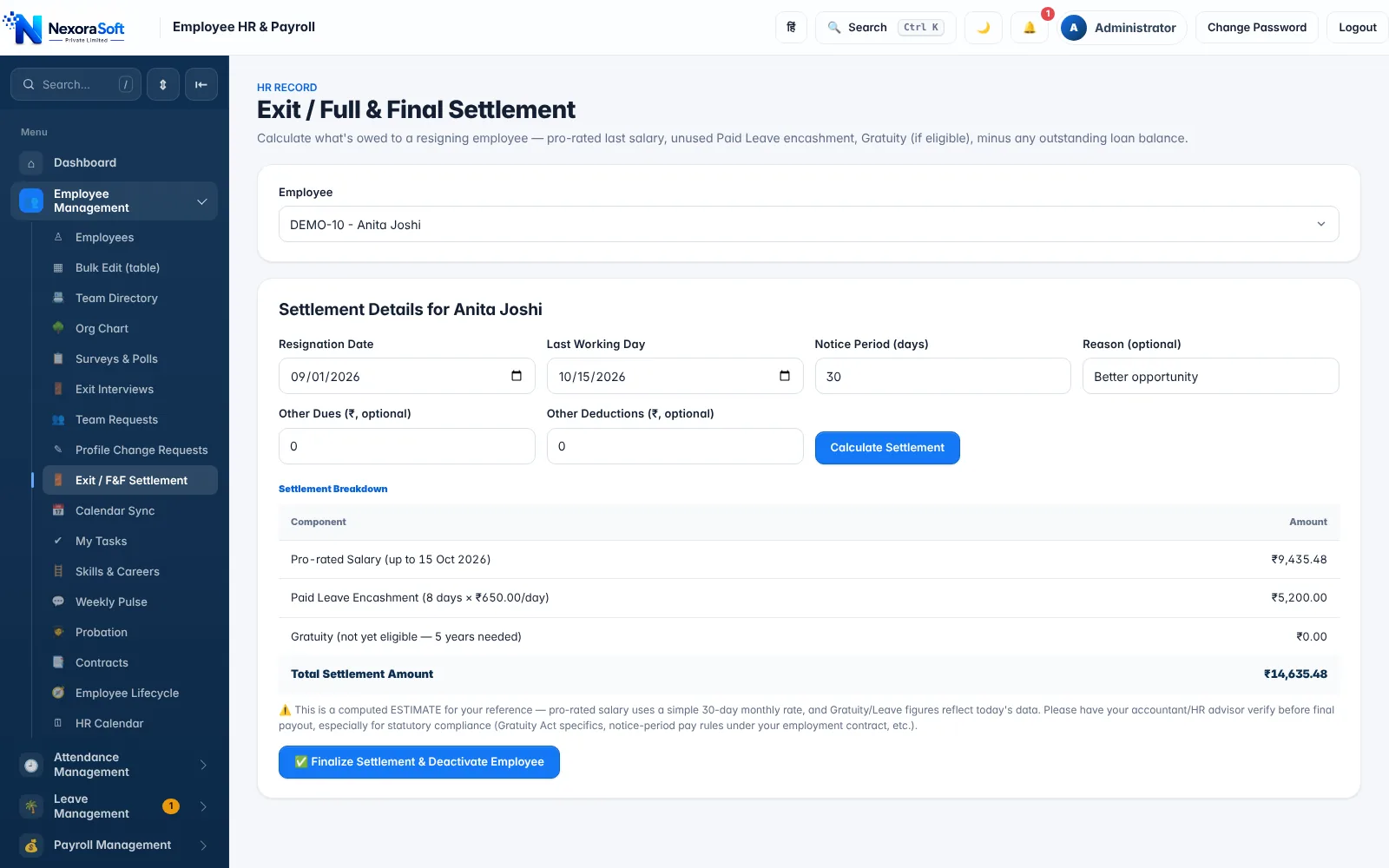
When an employee leaves, the final settlement mixes pro-rated salary, leave encashment, notice-period recovery, gratuity and any loans or dues. NexoraHRMS calculates the components in one exit workflow, so HR and finance start from the same sheet.
The screen shows each component with its amount and a total settlement. It is a computed estimate for your reference; your accountant or HR advisor should verify gratuity and notice rules for the specific case before the settlement is paid.
- Pro-rated salary up to the last working day
- Paid-leave encashment as per policy
- Gratuity for employees with five or more years of service
- Loan and advance recovery before settlement
- See full and final settlement software

Payroll Compliance & Statutory Reports
Statutory compliance is where manual payroll breaks. Before every run, NexoraHRMS checks your data and flags problems while there is still time to fix them, then produces the files you file or upload. A compliance calendar tracks due dates for PF, ESI, TDS, Form 24Q and bonus, with overdue alerts and a "mark done" log.
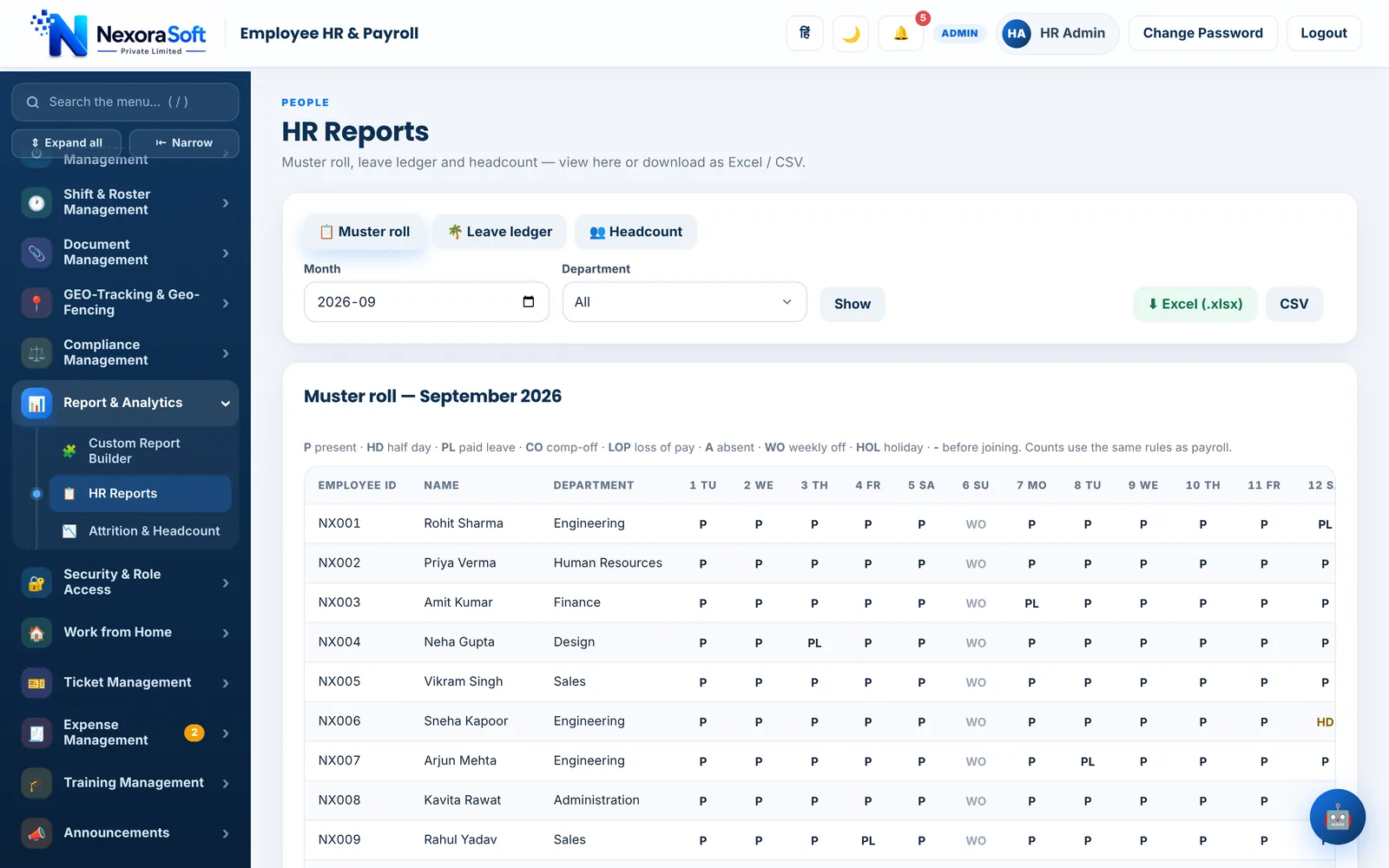
Registers and reports include the muster roll, the Register of Wages, Labour Welfare Fund contribution report, minimum-wage check and a Labour Code impact simulator that shows how the 50% wages rule would change PF and gratuity. See payroll compliance software in India.
- Pre-check for duplicate PAN or bank account, missing IFSC, UAN or ESI number
- Zero or negative salary, excessive loss of pay, loan EMI above gross
- Compliance calendar for PF, ESI, TDS, Form 24Q and bonus due dates
- EPFO ECR, ESI challan, Form 24Q summary and annual TDS statement
- Statutory registers, Labour Welfare Fund and minimum wages check
Tally Payroll Integration
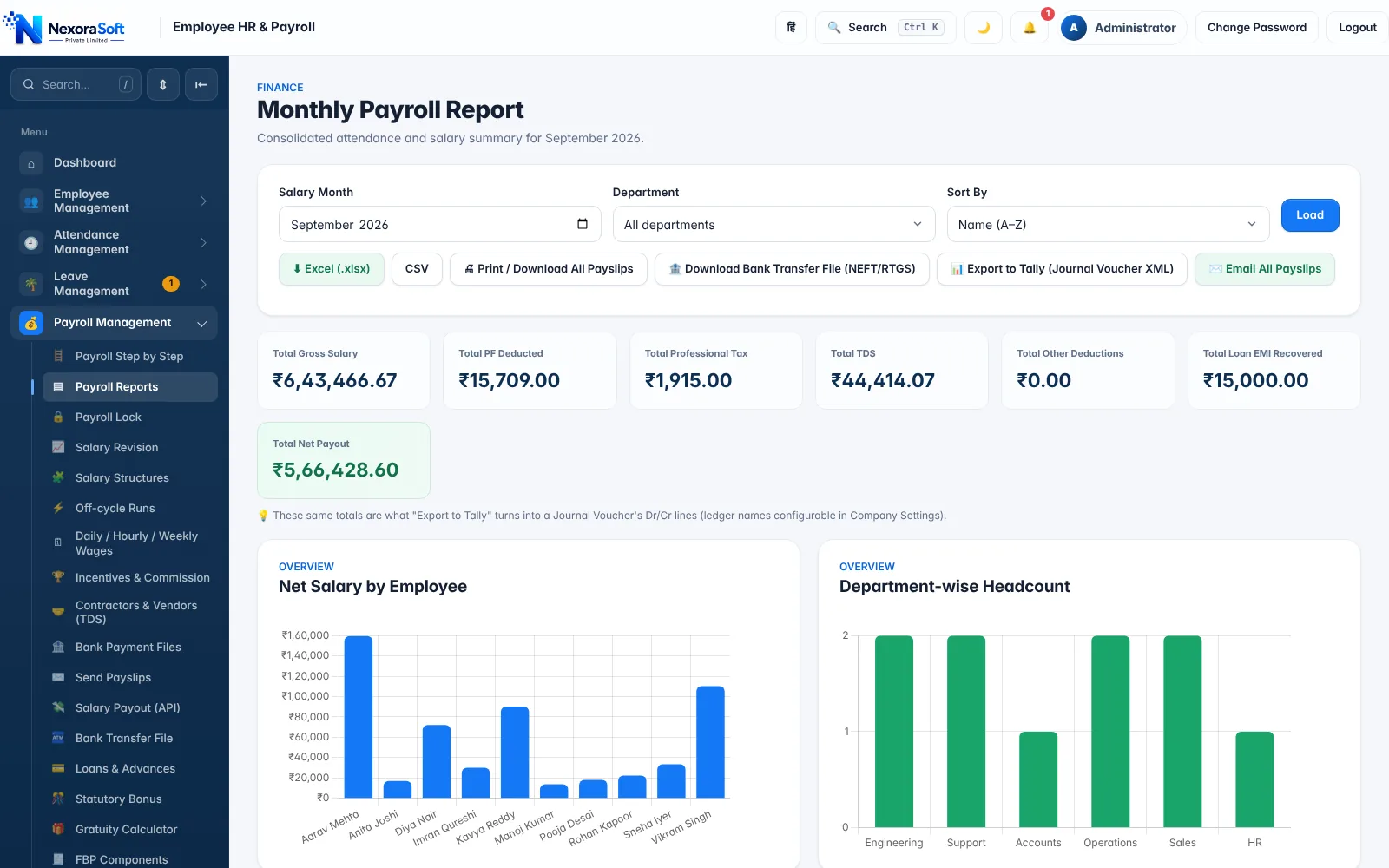
Accounts teams that live in Tally do not want to re-key payroll. NexoraHRMS exports the month's payroll as a Tally journal voucher in XML, with Dr/Cr lines for salary expense, PF, Professional Tax, TDS, loans, other deductions and salary payable.
Ledger names are configurable in Company Settings, so the voucher imports into your existing chart of accounts. Live two-way connections with Tally or other accounting software are available as custom integration. Details on payroll Tally integration, and our Tally integration services.
- One-click "Export to Tally (Journal Voucher XML)" on the payroll report
- Ledger names you control, so no manual mapping after import
- Same totals as the payroll report, so books and payroll always agree

Salary Bank Transfer & Bank File
Paying 50 or 500 employees one by one is slow and risky. NexoraHRMS creates a bulk-upload file from final net pay, using the layout for HDFC, ICICI, SBI or Axis, or a generic layout, with NEFT, RTGS or same-bank transfer modes chosen by amount.
Bank templates change, so always upload a one-employee test file first and compare columns against your bank's current template. Rows with missing or invalid IFSC are flagged so they do not fail the whole batch. See salary bank transfer software.
- Bank file for salary, off-cycle runs, wage runs and vendor payments
- Warning when the month is not locked yet
- Employees without bank details listed before you download
Payroll Software for Small Businesses
Small businesses need payroll that is simple to start and does not break compliance as headcount grows. If you are on Excel today, NexoraHRMS lets you start with employees, attendance and a monthly run, and switch on PF, ESI, PT and TDS as they become applicable to you.
A first-day setup wizard walks you through company details, statutory settings, attendance rules, holidays, shifts, a salary structure and adding people, and can load demo data so you can try a full payroll cycle before using real employees. See payroll software for small business, startups and MSMEs.
- Setup wizard and optional demo data to learn the system
- Start with the modules you need, add more later
- Bulk import of employees from Excel or CSV, and migration from another tool
- Fixed-scope quote after a free demo

Inside NexoraHRMS: Real Payroll Software Screens
No mock-ups. These are screens from the live product, captured with demo employee data. Click any screen to enlarge it.
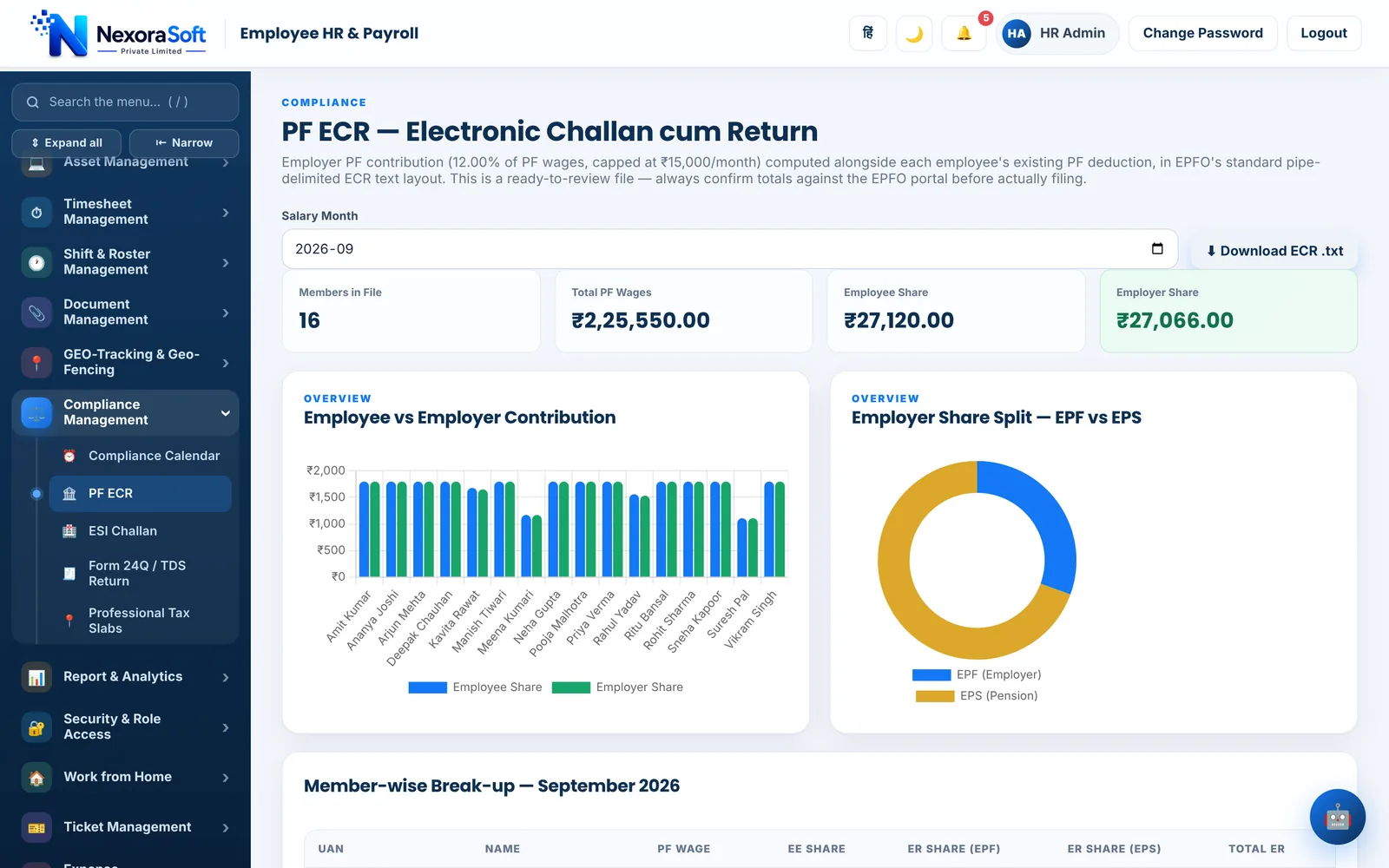




Employee names, PAN, UAN and bank numbers in these screenshots are demo data.
How Payroll Processing Works in NexoraHRMS
Capture attendance
Selfie/GPS check-in, QR kiosk, biometric import or bulk upload. Leave and corrections flow in with approvals.
Pre-check & preview
Catch duplicate PAN, missing IFSC or UAN and preview net pay before anything is saved.
Approve & lock
Review, approve and lock the month. Locked payslips are frozen and can't change later.
Pay & file
Email payslips, export the bank file and Tally entries, and generate ECR/ESIC files.
Payroll Software vs Excel Payroll
| Task | Excel / spreadsheet payroll | NexoraHRMS & Payroll |
|---|---|---|
| PF, ESI, PT, TDS | Manual formulas updated by hand | Calculated automatically; PT slabs editable by state |
| Form 16 and Form 24Q | Separate tool or CA | Generated from payroll data |
| Attendance to salary | Copy-paste from attendance files | Attendance, leave and LOP flow straight into the run |
| Error checks | Found after salary is paid | Pre-check flags issues before the run |
| Payslips | Built and sent one by one | Generated and emailed in bulk |
| Bank and Tally | Re-keyed from the sheet | Bank file and Tally XML in one click |
| Access control | Anyone with the file sees everything | Role-based access with an audit trail |
Read the full comparison: payroll software vs Excel.
What Should Payroll Software in India Include? A Buyer's Checklist
Use this list when you compare payroll software. A good product ticks every box and lets you test each one on a live demo with your own salary structure.
Pay calculation
Salary calculation · Attendance integration · Leave management · Loss of pay · Arrears and one-time earnings
Statutory deductions
PF calculation · ESI calculation · Professional Tax · TDS (both regimes) · Statutory bonus · Labour Welfare Fund
Returns and files
Form 16 · Form 24Q summary · ECR · ESI challan · Bank salary file · Tally integration
People and money
Payslips · F&F settlement · Salary advances · Loans & EMI · Expense claims · Gratuity
Control and audit
Employee self-service · Audit trail · Role-based access · Month lock · Dual-control salary revision
Scale
Multi-branch payroll · Bulk import · Mobile app · API and webhooks · Hindi and English
Who Needs Payroll Software?
Any business that pays salaries and has to deduct PF, ESI, Professional Tax or TDS benefits from payroll software, and the benefit grows with headcount, branches and shifts. In practice the biggest gains come for:
- Small businesses, startups and MSMEs leaving Excel
- Manufacturing companies with shifts, overtime and contract labour
- Hospitals, clinics and schools with mixed staff categories
- IT companies, professional services firms and NBFCs
- Retail businesses, construction companies and NGOs with daily or weekly wages
- Multi-branch companies that need one view of payroll
Payroll Software for Different Industries
SMEs & Startups
Move off Excel payroll and stay compliant as headcount grows. Small business · Startups · MSME
Manufacturing & Factories
Shift-based staff, loss of pay, overtime and strict PF/ESI deadlines. Manufacturing payroll
Schools & Colleges
Teaching and non-teaching staff payroll with leave and advances. School payroll
Hospitals & Clinics
Doctors, nurses and support staff on shifts, paired with our hospital management software. Hospital payroll
Construction & Contractors
Daily-wage and weekly-wage workers, sites and contractor TDS. Construction payroll
Retail & Chains
Store-wise payroll, rotating shifts and incentives. Retail payroll
IT Companies
Monthly salaried teams, WFH attendance, reimbursements and TDS. IT company payroll
NBFCs & Finance
Branch-wise payroll, dual-control salary revisions and audit-ready records. See NBFC software.
Multi-Branch Companies
Many branches and offices in one system, with branch-wise reports. Multi-branch payroll
Multi-Company & Multi-Branch Payroll
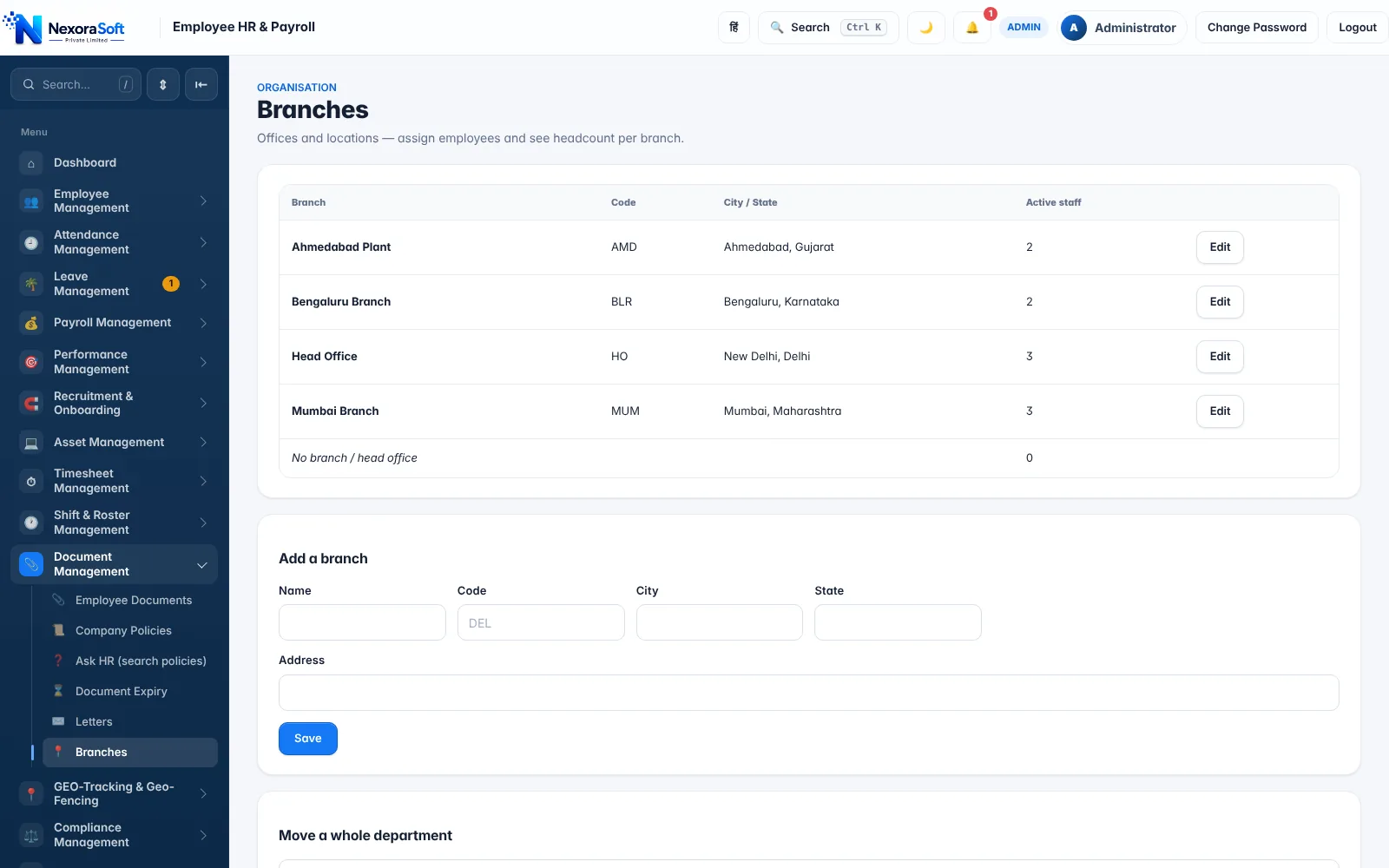
One NexoraHRMS installation handles many branches, offices and departments, with branch-wise filters and reports and role-based access for admin, HR manager, finance viewer and employee. Employees can be mapped to branches and the workforce reviewed branch by branch.
Companies with separate legal entities, each with its own PF, ESI and PAN registrations, run a separate installation per entity, which keeps statutory files, signatories and data cleanly apart. We can help set up and maintain several installations for a group.
- Branch master with head count per branch
- Branch and department filters on reports
- Role-based access so branch managers see only what they should
- See multi-branch payroll software
Payroll Software in Delhi NCR and Across India
NexoraSoft is based in Kirti Nagar, New Delhi, and provides payroll software, HRMS software and support to businesses in Delhi, Noida, Gurgaon, Faridabad and Ghaziabad, as well as across India. Demos run over video call, so location is never a barrier.
Payroll software DelhiPayroll software NoidaPayroll software GurgaonPayroll software FaridabadPayroll software GhaziabadPayroll software Delhi NCR
Payroll Software Pricing in India
There is no single price for payroll software, because needs differ. The main cost drivers are the number of employees, how many branches or legal entities you run, which modules you switch on (attendance, kiosk, mobile app, recruitment, performance), whether the software is hosted for you or installed on your own server, and any custom integration such as Tally, bank APIs or biometric devices.
NexoraSoft prices payroll on a fixed scope, agreed after a free demo and a look at your salary structure, so you know the cost before any work starts. Read what drives payroll software pricing or see our pricing page.
Payroll Topics: Explore Each Part of Payroll in Depth
Payroll in India has many moving parts. Each guide below goes deep on one of them, with the real NexoraHRMS screen that handles it.
Payroll Management SoftwareSalary Calculation SoftwareAttendance & Payroll SoftwarePF Payroll SoftwareESI Payroll SoftwareProfessional Tax SoftwareTDS Payroll SoftwareForm 16 SoftwarePayslip SoftwareFull & Final Settlement SoftwarePayroll Tally IntegrationSalary Bank Transfer SoftwarePayroll Compliance SoftwareHRMS Software IndiaPayroll Software Pricing
Payroll Guides & Articles
Plain-language guides to payroll calculation, compliance and software selection for Indian businesses.
What Is Payroll Software? Complete Guide for Indian BusinessesBest Payroll Software in India: Features to Look ForPayroll Processing in India: Step-by-Step GuideHow to Calculate Salary in IndiaPF Calculation on Salary: Complete GuideESI Calculation in IndiaProfessional Tax Calculation by StateTDS on Salary: Complete GuideForm 16: What It Is and How It Is GeneratedPayroll Software vs Excel: Which Is Better?How Attendance Software Integrates With PayrollHow to Automate Monthly Salary ProcessingPayroll Compliance Checklist for Indian CompaniesPayroll Software for Small BusinessesPayroll Software for Manufacturing CompaniesPayroll Software for HospitalsPayroll Software for SchoolsPayroll Software With Tally IntegrationSalary Slip / Payslip: Complete GuideFull & Final Settlement CalculationHR & Payroll ERP
NexoraSoft: The Team Behind the Payroll Software
Indian software company in Delhi NCR
Plot No. 31, 3rd Floor, Moti Nagar Rd, Kirti Nagar, New Delhi 110015. Phone +91 98115 51004, email info@nxorasoft.com.
19+ years, 50+ projects
Enterprise software experience from network and telecom systems to ERP, HMS, CRM and payroll. See portfolio and case studies.
Demo and support
Free live demo on video call, onboarding help and support, with an about page, privacy policy, terms and refund policy published openly.
Payroll Software & HRMS: 22 Frequently Asked Questions
Payroll software calculates salaries, statutory deductions (PF, ESI, Professional Tax, TDS) and payslips automatically from attendance and leave data. Indian companies use it because statutory rules change by state and tax regime, and manual spreadsheet payroll is slow and error-prone. See our complete guide to payroll software.
Payroll management software covers the whole salary cycle, not just the arithmetic: salary structures, attendance and leave inputs, statutory deductions, approvals, payslips, bank payment and statutory files. NexoraHRMS is built as a payroll management system for Indian businesses.
Attendance and leave feed the monthly run. The software applies each employee's salary structure, calculates PF, ESI, Professional Tax and TDS, flags errors in a pre-check, then you approve and lock the month. After that you email payslips and download the bank file, Tally entries and statutory files. Read the step-by-step guide.
It depends on your size, states and integrations. Check that it handles PF, ESI, state-wise PT, both tax regimes, Form 16, attendance and a bank file, and ask for a live demo with your own salary structure. Our buyer's feature checklist lists what to test.
It starts from the salary structure (basic, HRA, allowances), adjusts for payable days using attendance, leave and loss of pay, adds arrears, overtime or one-time earnings, then subtracts statutory and other deductions to reach net pay. See salary calculation software.
Yes. NexoraHRMS calculates employee and employer Provident Fund against the PF wage ceiling set in Company Settings, shows the EPF/EPS split and produces an EPFO ECR text file. Details on the PF payroll software page.
Yes. Employees whose gross wages are within the ESI ceiling (₹21,000 per month) are picked up automatically, with employee 0.75% and employer 3.25% contributions and a monthly challan statement. See ESI payroll software.
Yes. Switch on state-wise slabs and each employee's PT is looked up from the slab of their work state, including February overrides where a state uses them. Slabs are editable, so a state revision never needs a software update. See Professional Tax software.
Yes. NexoraHRMS projects and deducts monthly TDS on salary under the New or Old tax regime, using each employee's declarations (rent, 80C, 80D) in the Old regime. More on TDS payroll software.
NexoraHRMS generates the Form 16 Part B annexure and an annual TDS statement for every employee from actual payroll data. Part A is downloaded by the employer from the TRACES portal after the TDS return is filed. See Form 16 software.
Yes. The PF ECR screen builds the Electronic Challan cum Return text file from the month's payslips, with UAN, wages, employee and employer shares, ready to upload on the EPFO portal.
Yes. Each month's payroll can be exported as a Tally journal voucher in XML, with the ledger names you configure for salary, PF, PT, TDS, loans and salary payable. Live API connections are available as custom integration. See payroll Tally integration.
Yes. Through the employee self-service portal and the installable mobile app, staff can view and download payslips and annual tax statements. HR can also email PDF payslips in bulk or share them on WhatsApp. See payslip software.
NexoraHRMS imports punch-machine files (employee code, date and time) from biometric devices, so fingerprint or face-machine punches flow into attendance and payroll. It also supports selfie and GPS check-in and a QR/PIN kiosk. See attendance and payroll software.
Yes. Employees check in from the mobile app with a selfie and GPS location, checked against office geofences you define. Out-of-zone punches can be flagged for review.
Yes. Leave types with quota, accrual and carry-forward are configured in the leave policy engine, approved leave is paid, and unpaid days become loss of pay automatically in the salary run.
Yes. One installation handles many branches and departments, with branch-wise reports and role-based access. Separate legal entities with their own PF, ESI and PAN registrations should use separate installations. See multi-branch payroll software.
Yes. Loans and salary advances go through approval, EMI is recovered from net pay every month until the balance is zero, and the deduction shows on the payslip.
Yes. NexoraHRMS produces bulk-upload files for HDFC, ICICI, SBI and Axis plus a generic layout, with NEFT, RTGS or same-bank transfer modes. Always test with one small file against your bank's current template first. See salary bank transfer software.
Cost depends on the number of employees, modules, branches and integrations, and on whether you want hosted or self-hosted deployment. NexoraSoft gives a fixed-scope quote after a free demo. See payroll software pricing in India for what drives the price.
Yes. NexoraSoft offers a free live demo over video call. Call +91 98115 51004 or email info@nxorasoft.com and we will set it up within 24 hours.
Ready to automate your payroll?
Book a free live demo of NexoraHRMS & Payroll. Share your salary structure and see your own payroll run. No commitment; we typically respond within 24 hours.